How it works
HBO Plugin implements a signal → proposal → approve/reject → optional execute → audit operating loop inside Hermes.
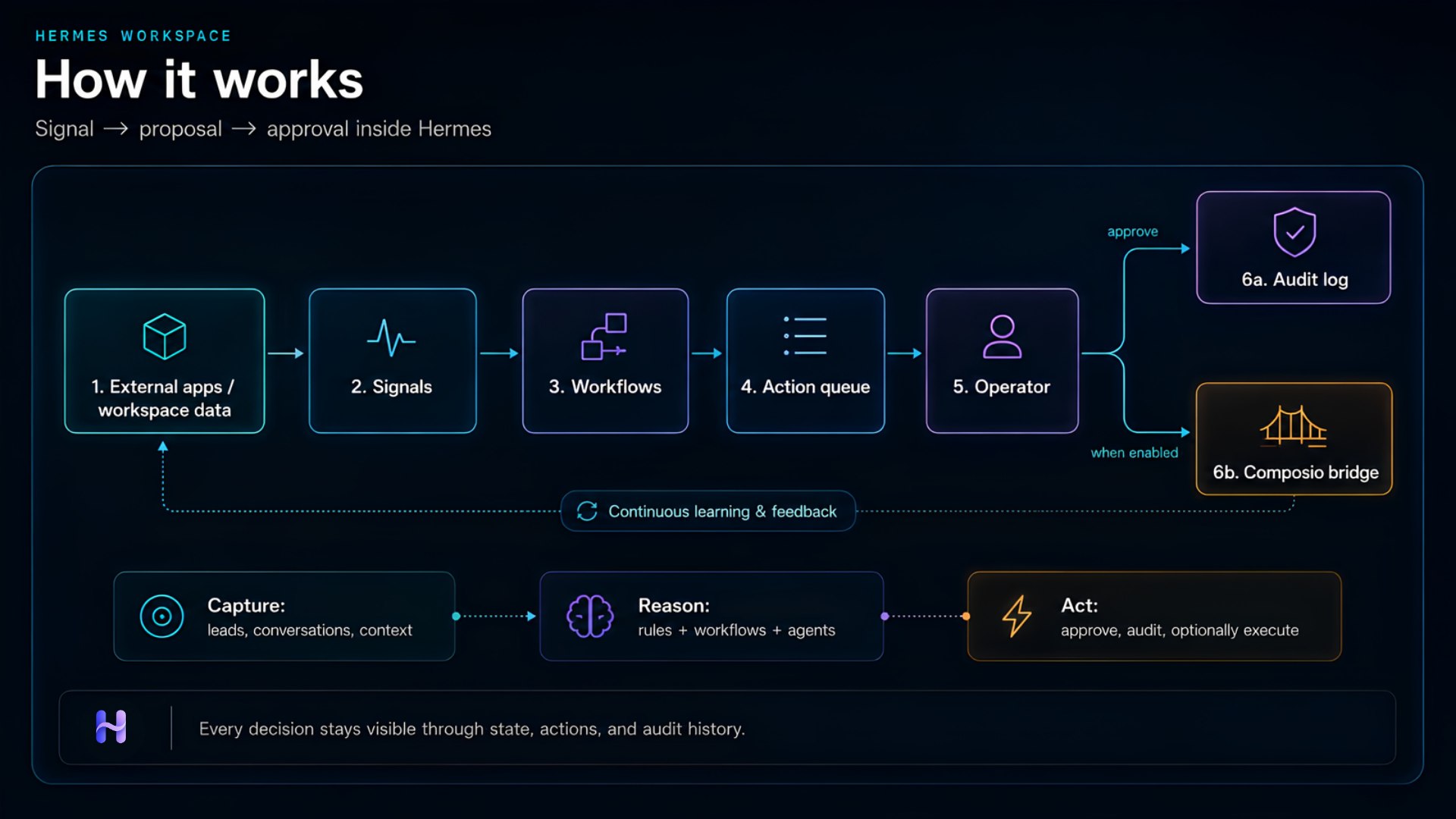
Approve records intent. Execute is a separate step for eligible approved actions when the bridge is set to composio or hybrid. External effects never run on approve alone.
1. Data capture
Local workspace
The plugin stores workspace state as file-backed JSON: leads, conversations, signals, action proposals, audit entries, briefings, and agent metadata. Plugin tools and the dashboard API read and write the same state through state.py.
You can operate entirely on this local workspace without connecting external apps.
Connected apps
When the composio-cli skill is enabled, Hermes can read and write external apps (Gmail, Slack, HubSpot, etc.). Signals and actions still flow through the same plugin tools and approval gates — the bridge is the execution layer.
2. Signals
A signal is a business event that needs attention. Examples:
| Type | Meaning |
|---|---|
missed_followup | High-priority lead with no follow-up in 48h |
bot_qa | Bot response may be incomplete or need human review |
Signals are exposed via:
hbo_detect_signals— list open signals- Dashboard Overview and workflow outputs
- Ops Lead briefing priorities
Workflows can also create new signals when they scan conversations and leads (see inbound_sales in the plugin).
3. Workflows
Three built-in workflows drive the operating loop:
| Workflow | Agent | What it does |
|---|---|---|
inbound_sales | Sales Ops | Scans conversations needing review, flags bot QA, creates follow-up proposals |
outbound_growth | Growth | Scores leads, builds outreach batches, drafts outreach action proposals |
daily_ops_briefing | Ops Lead | Generates priorities, risks, and recommended next actions |
Run from Hermes with hbo_run_workflow or from the dashboard Workflows page.
Example: inbound sales
- Workflow iterates conversations with
status: needs_review. - Creates a
bot_qasignal for each flagged conversation. - Appends a pending action: "Review bot conversation".
- Iterates leads with
needs_followuporhotstatus. - Appends follow-up action proposals assigned to
sales-ops-agent.
4. Action proposals
Actions are proposals — not auto-executed. Each has:
| Field | Purpose |
|---|---|
title | Short description |
agentId | Owning profile (sales-ops, growth, ops-lead) |
risk | low, medium, or high |
status | pending, approved, rejected, executed, or failed |
source | Lead or conversation ID |
List with hbo_list_actions. Filter by status: pending for the approval queue.
5. Approvals and execution
Operators review the queue in:
- Hermes chat — list pending actions, approve or reject, then execute when needed
- Dashboard → Actions — approve, reject, and Execute buttons with live state updates
| Tool | What it does |
|---|---|
hbo_approve_action | Marks approved, writes audit event — no external side effects |
hbo_reject_action | Marks rejected, writes audit event |
hbo_execute_action | Runs external effects for eligible approved actions (bridge composio / hybrid) |
hbo_list_audit_events | Full trace of approvals, rejections, executions, and workflow runs |
Every decision is traceable in Audit.
6. Daily briefing
The Ops Lead workflow aggregates workspace state into a briefing:
- Pending approvals count
- Open signals needing review
- Risk flags (elevated-risk actions, signal backlog)
- Top recommended next actions
Generate with hbo_generate_briefing or hbo_run_workflow with daily_ops_briefing.
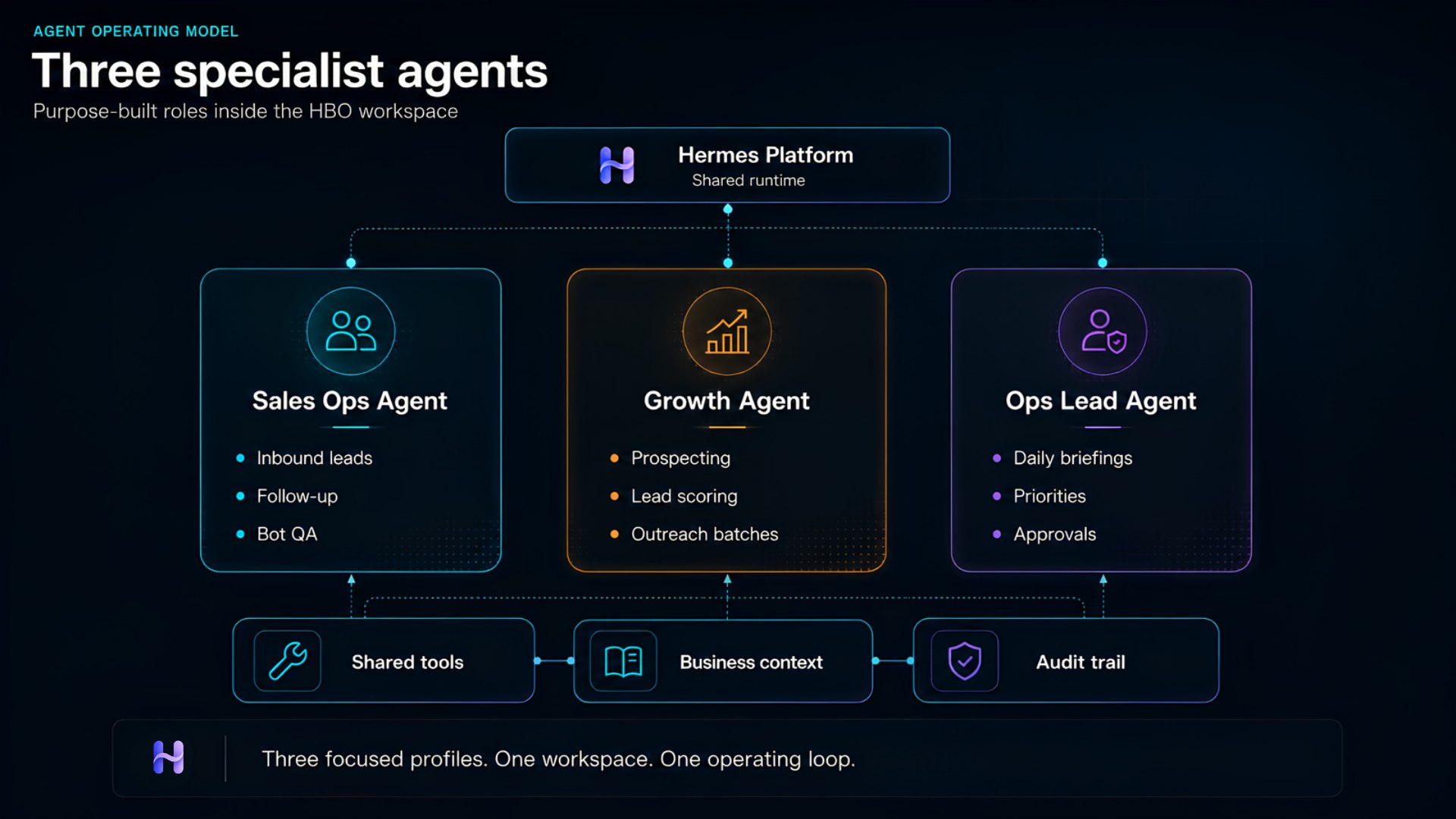
7. Three agents, one workspace
| Profile | Role in the loop |
|---|---|
| Sales Ops | Inbound conversations, bot QA, lead follow-ups |
| Growth | Outbound scoring, segments, outreach batches |
| Ops Lead | Daily briefing, prioritization, approval coordination |
Profiles install separately but share the same HBO Plugin state and dashboard.
Try it yourself
Copy the install prompt into Hermes. It runs the full loop: install → briefing → action queue → approve one → audit.